
Contrary to the belief that owning hardware saves money, your on-premise server is a depreciating liability that actively drains your SME’s resources through hidden operational costs and unmitigated risks.
- Direct operational costs like power, cooling, and real estate can double the perceived expense of a server.
- The financial risk from a single hour of downtime or a security breach often exceeds the entire annual IT budget.
Recommendation: Shift your perspective from viewing servers as a capital expenditure (CAPEX) to analysing their total cost of ownership (TCO) as an ongoing operational drain (OPEX), factoring in the high cost of inaction.
For many IT Managers in established UK SMEs, the on-premise server room feels like a bastion of control. You can see it, touch it, and manage it directly. The alternative, the cloud, can seem abstract and brings up valid questions about data security and sovereignty. This debate often revolves around a simple comparison of hardware purchase costs versus monthly subscription fees. However, this view misses the bigger picture entirely.
The true cost of on-premise infrastructure isn’t on the initial invoice. It’s a creeping expense, accumulating in unbudgeted electricity bills, wasted commercial real estate, and the ever-present, business-ending risk of downtime and cyber-attacks. The conversation shouldn’t be about « owning vs. renting » but about « asset vs. liability. » A physical server is a depreciating asset that demands constant, expensive attention, while a well-managed cloud environment is a flexible utility that powers growth.
This analysis moves beyond surface-level comparisons. We will dissect the Total Cost of Ownership (TCO) and, more importantly, the Total Cost of Inaction (TCI) for UK SMEs still reliant on legacy hardware. By quantifying the hidden costs and risks, we will provide a clear, data-driven framework for IT leaders to determine the precise point at which their server room transitions from a perceived asset to a tangible financial liability.
To provide a comprehensive analysis, this article breaks down the financial and operational impact of on-premise infrastructure. The following sections will guide you through a complete TCO evaluation, from direct expenses to the catastrophic costs of failure.
Table of Contents: Uncovering the Hidden Liabilities of On-Premise Infrastructure
- Why Electricity and Cooling Costs Double Your Server Room Expense?
- Rent Rates vs Server Costs: Which Expense Weighs Heavier on Margins?
- On-Premise vs Cloud Security: Which Is Safer for Client Data Today?
- The Hardware Failure That Left a Law Firm Offline for 3 Days
- Why 1 Hour of Downtime on Cyber Monday Costs Average UK Retailers £100k?
- How to Ensure Your Architecture Scales Instantly During Black Friday Traffic?
- How to Move Legacy Apps to the Cloud Without Rewriting Code?
- When to Stop Buying Servers: Recognizing the Point of No Return
Why Electricity and Cooling Costs Double Your Server Room Expense?
The most frequently overlooked expenses in any on-premise TCO calculation are environmental. A server is not a one-time purchase; it’s a machine that consumes a significant amount of power 24/7, 365 days a year. This direct electricity consumption is only half the story. For every watt of power a server uses, an equivalent amount is often required for cooling systems (HVAC) to maintain an optimal operating temperature and prevent thermal shutdown. In an era of volatile energy prices in the UK, these combined costs are no longer a minor line item but a major operational expenditure.
These are not sunk costs; they are active, recurring drains on your company’s profitability. Unlike a cloud provider, which benefits from massive economies of scale in purpose-built data centres with hyper-efficient cooling, an SME’s server closet or small server room is an inherently inefficient environment. The cost of running a few servers can quickly spiral, consuming a disproportionate amount of the IT budget that could otherwise be invested in innovation.
A detailed analysis of these operational expenses often reveals a startling truth: the annual cost of power and cooling alone can approach the cost of the hardware itself over its lifecycle. The following breakdown illustrates how these hidden costs compare to a cloud-based alternative, where these expenses are completely absorbed by the provider.
| Cost Component | On-Premise (Annual) | Azure Cloud (Annual) |
|---|---|---|
| Hardware refresh | £8,000-12,000 | £0 |
| Electricity & cooling | £4,800-7,200 | £0 |
| IT maintenance | £15,000-25,000 | £3,000-5,000 |
| Floor space | £3,600-6,000 | £0 |
| Total estimated | £31,400-50,200 | £15,000-25,000 |
Considering these figures, it becomes clear that focusing solely on the hardware purchase price provides a dangerously incomplete financial picture. The true operational burden must be factored into any strategic decision.
Rent Rates vs Server Costs: Which Expense Weighs Heavier on Margins?
Beyond power and maintenance, your on-premise server consumes another valuable resource: physical space. In UK business hubs like London or Manchester, commercial real estate is a premium commodity. A 10-square-metre server room is not just a utility closet; it’s a significant recurring expense on your lease. This space, when analysed from an opportunity cost perspective, represents a direct loss of potential revenue-generating activity. That square footage could house two additional sales desks, a client meeting room, or workspace for a growing team.
This « opportunity cost of space » is a critical component of the Total Cost of Inaction. By dedicating prime office real estate to housing depreciating hardware, a business is actively choosing to forgo growth. A cloud migration immediately frees up this physical space, converting a cost centre into a potential profit centre. For an SME where every square foot impacts the bottom line, this is not a trivial consideration. The cost of housing a server can, in some high-rent districts, outweigh the cost of the hardware itself over its lifespan.
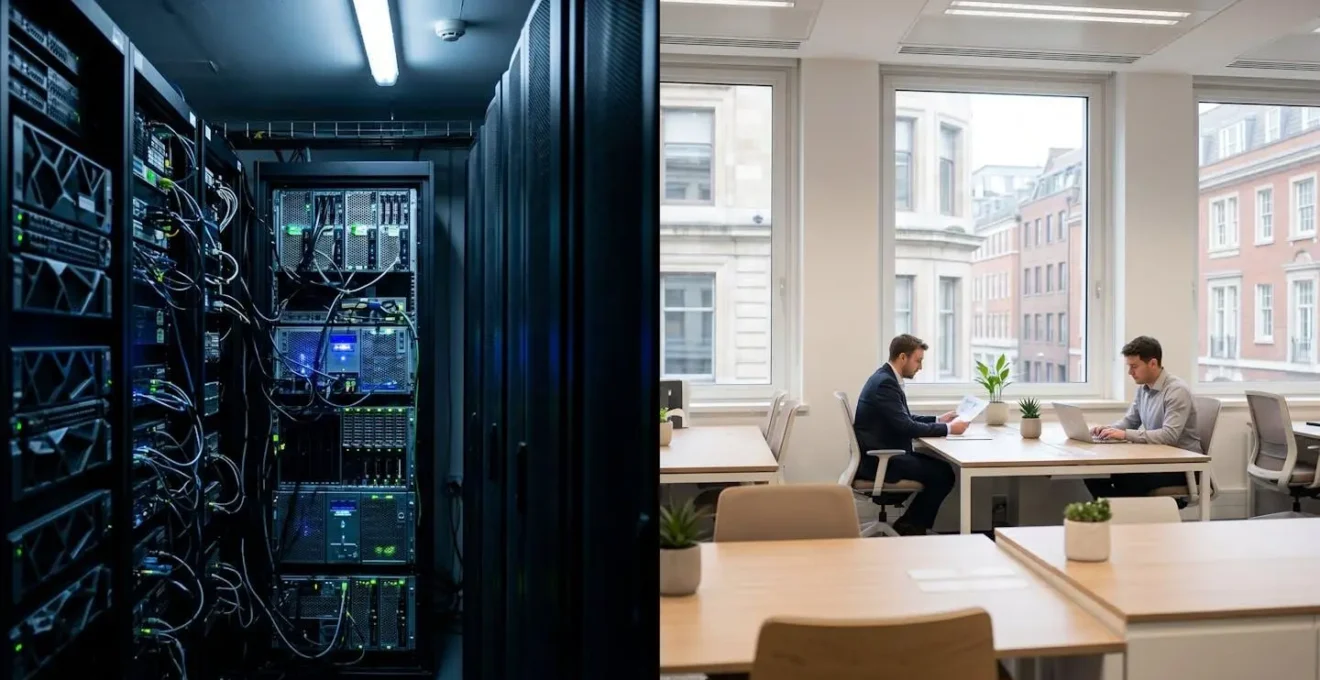
The visual contrast is stark: a dark, cramped space filled with noisy, heat-producing racks versus a bright, collaborative environment that directly contributes to business objectives. The decision to retain on-premise servers is an implicit decision to prioritise infrastructure over people and productivity. The table below quantifies this trade-off for various UK locations, highlighting the substantial revenue potential being sacrificed.
| Location | 10sqm Annual Rent | Cooling/Power Costs | Opportunity Cost |
|---|---|---|---|
| Central London | £8,000-12,000 | £4,800 | 2 sales desks = £500k revenue |
| Manchester | £3,600-5,400 | £4,200 | Client meeting room value |
| Leeds Business Park | £2,400-3,600 | £3,600 | Additional workspace for 3 staff |
When rent and opportunity cost are combined, the financial argument for eliminating the on-premise server room becomes overwhelming. It’s an expensive luxury that modern, agile SMEs can no longer afford.
On-Premise vs Cloud Security: Which Is Safer for Client Data Today?
The argument that on-premise servers are more secure because you « control » them is one of the most persistent myths in IT. In reality, physical control creates a false sense of security. An on-premise environment places the entire burden of cybersecurity—from physical access control to patching, firewall configuration, and threat detection—squarely on the shoulders of the SME’s IT team. This is a 24/7 job that requires a level of specialised expertise and investment that is often beyond the reach of a small business. In fact, recent industry research reveals that 80% of UK and US SMEs suffered a cyber attack in the first half of 2024, with unpatched on-premise systems being a primary vector.
In contrast, major cloud providers like Microsoft Azure and AWS employ thousands of world-class security experts and invest billions annually in securing their infrastructure. They provide a level of physical and digital security—including automated threat detection, DDoS mitigation, and robust identity management—that is simply unattainable for most SMEs. While the client is still responsible for securing their data *in* the cloud (the shared responsibility model), the provider secures the underlying infrastructure, dramatically reducing the attack surface.
Many SMEs dedicate less than 5% of their IT budgets to security, even as they face increasing cyber incidents.
– UK Government Report, Insuring Resilience – The state of SME cyber insurance
This under-investment in security for on-premise systems has a direct financial consequence. Insurers are acutely aware of the risks. As a result, cyber insurance specialists report that UK SMEs with on-premise servers often face significantly higher premiums, ranging from £1,000 to £3,000 annually, compared to those with professionally managed cloud environments. This premium reflects the stark reality: the risk of a breach is higher, and the potential cost, which can exceed £500,000, is a liability that insurers are increasingly hesitant to cover without stringent controls in place—controls that are native to cloud platforms.
The Hardware Failure That Left a Law Firm Offline for 3 Days
The abstract risk of a security breach becomes devastatingly real when it happens. The reliance on a single piece of hardware or a self-managed security configuration creates a single point of failure that can cripple a business. While many on-premise defenders focus on external threats, internal vulnerabilities and simple human error are just as dangerous. The consequences are not just financial; they include severe reputational damage and regulatory penalties, particularly under the ICO’s watchful eye.
Consider a recent, cautionary tale. While the breach occurred on a poorly configured cloud server, the root cause is endemic to the on-premise mindset: a lack of fundamental security controls that are often overlooked without dedicated expertise.
Case Study: The Price of Inadequate Security
In October 2024, the ICO reprimanded a UK law firm after a severe data breach where threat actors gained access using legitimate credentials. The failure to implement basic security measures like multi-factor authentication (MFA) led to the exposure of sensitive personal data from 8,234 UK clients, which was subsequently published on the dark web. The firm faced not only significant reputational damage but also regulatory action for failing to protect its client data adequately.
This incident underscores the immense responsibility of managing your own infrastructure. A single misconfiguration or a delayed security patch can have catastrophic results. When a physical server fails or is compromised, the business grinds to a halt. Fee-earners cannot work, client data is at risk, and the clock starts ticking on a costly recovery process. In the event of a ransomware attack, the costs escalate dramatically. Beyond the disruption, cybersecurity specialists confirm the average ransomware payment demand for UK businesses reached £438,500 in late 2024. This figure doesn’t even include the cost of remediation, legal fees, and regulatory fines, making a single hardware failure a potentially business-ending event.
Why 1 Hour of Downtime on Cyber Monday Costs Average UK Retailers £100k?
For a UK retailer, e-commerce site, or any business with transactional revenue, downtime is not an IT problem; it’s a direct and immediate loss of income. This is never more apparent than during peak trading periods like Black Friday and Cyber Monday. An on-premise server, with its fixed capacity, represents a significant business risk. If traffic surges beyond the hardware’s limit, the system slows down or, worse, crashes entirely. Every minute of downtime during these critical sales events translates into lost orders, frustrated customers, and long-term brand damage.
The financial impact is staggering. Conservative estimates suggest that a single hour of downtime on Cyber Monday can cost an average UK SME retailer over £100,000 in lost sales alone. But the costs don’t stop there. System failure under load often points to deeper issues, such as unpatched vulnerabilities or inadequate infrastructure management, which can lead to severe regulatory penalties from the Information Commissioner’s Office (ICO).
Case Study: The Real Cost of Security Lapses
The ICO’s enforcement actions show the true cost of failing to maintain robust infrastructure. In 2025, Capita faced a £14 million settlement for a breach caused by a 58-hour delay in quarantining a compromised device. Similarly, Advanced was fined £3.1 million for failing to implement basic controls like MFA and leaving known vulnerabilities unpatched, which led to major disruption of NHS services. These cases demonstrate that the cost of inaction and inadequate security far outweighs the investment in modern, secure infrastructure.
This high-stakes environment is precisely why the market is shifting. The risk of relying on aging, inflexible hardware is becoming untenable for competitive businesses. A recent survey shows a clear trend, with a majority of UK SMEs now actively moving away from on-premise models to mitigate these risks. The data shows that, according to the TechUK Survey 2025, over 72% of UK SMEs have either completed or are in the process of migrating to the cloud since 2023, driven by the need for greater resilience and security.
How to Ensure Your Architecture Scales Instantly During Black Friday Traffic?
The fundamental weakness of on-premise infrastructure is its inflexibility. To handle a predictable peak in traffic like Black Friday, a business must invest in hardware capacity that will sit idle for the other 364 days of the year. This is an extremely inefficient use of capital. You are paying 100% of the cost for hardware that delivers its full value for less than 1% of the time. Even with this over-provisioning, an unexpected traffic surge can still overwhelm the system, leading to the costly downtime discussed previously.
Cloud architecture solves this problem through elastic scalability. Instead of being limited by a physical box, cloud-based applications can be configured to automatically request more resources—such as CPU power, memory, and bandwidth—in real-time as traffic increases. When the peak subsides, these resources are automatically released. This « pay-as-you-go » model means you only pay for the extra capacity for the few hours or days you actually need it, rather than owning and maintaining it all year round.
This capability is not just a convenience; it’s a strategic competitive advantage. It allows an SME to compete on a level playing field with larger enterprises, confident that their infrastructure can handle any level of customer demand without failing. It transforms the IT infrastructure from a rigid, capital-intensive cost centre into a flexible, operational expense that directly supports revenue generation. As one industry expert notes, the financial logic is compelling.
Swapping out clunky, outdated physical servers, which are in need of maintenance and upkeep, will save the average business a substantial sum year-on-year when they switch to cloud-based solutions.
– Michael Hamer, Client Strategy Director, Netitude
By leveraging the cloud, businesses can de-risk their peak trading periods, ensure a smooth customer experience, and maximise their revenue potential without the massive upfront investment in hardware that will be underutilised for the majority of the year.
How to Move Legacy Apps to the Cloud Without Rewriting Code?
One of the biggest hurdles for IT managers considering a cloud migration is the fear of a complex, disruptive, and expensive project, especially when dealing with critical legacy applications. The common misconception is that older software must be completely rewritten (re-architected) to function in the cloud. While that is one approach, modern migration strategies offer far less disruptive pathways, such as « re-hosting » (lift and shift) or « re-platforming. »
In a re-hosting scenario, the existing server—including its operating system, applications, and data—is essentially cloned as a virtual machine in the cloud. This is the fastest and least risky method, as it requires minimal changes to the application itself. It provides immediate benefits, such as improved reliability and the elimination of hardware maintenance, while buying time for future modernization. Re-platforming goes a step further by making minor adjustments to the application to take advantage of cloud-native services, like managed databases or auto-scaling, without a full rewrite.

Tools like Azure Migrate and AWS Migration Hub are designed specifically to facilitate this process. They can automatically discover on-premise servers, analyse dependencies, and recommend the best migration path. For many UK SMEs, a phased approach is ideal: start by re-hosting critical systems to quickly de-risk the on-premise environment, then strategically modernise applications over time. This method ensures business continuity and delivers a rapid return on investment. The key is to follow a structured, proven process.
Your Action Plan: A 5-Step Cloud Migration Process for Legacy Systems
- Audit & Discover: Use tools like Azure Migrate or AWS Migration Hub to create a complete inventory of on-premise servers, applications, and their dependencies.
- Define Goals: Establish clear Recovery Time Objectives (RTO) and Recovery Point Objectives (RPO) for business continuity. Set key performance indicators (KPIs) such as target cost savings and uptime percentage.
- Ensure Compliance: Choose UK or EU-based data regions within your cloud provider to comply with data sovereignty and GDPR requirements for your client data.
- Migrate with Zero Downtime: Utilise incremental data synchronisation tools. These allow users to continue working on the on-premise system while the data is copied to the cloud, ensuring a seamless cutover.
- Monitor & Optimise: After migration, use native tools like Azure Cost Management or AWS Cost Explorer to monitor spending monthly. Set up budget alerts to prevent unexpected costs and optimise resource usage.
By following this methodical approach, migrating legacy applications becomes a manageable and low-risk project, not a daunting rewrite. The focus is on achieving business objectives, not just technological change.
Key Takeaways
- On-premise TCO is not just hardware; it’s a recurring expense of power, cooling, real estate, and specialised maintenance staff.
- The opportunity cost of using prime office space for servers often exceeds the annual rent, representing lost revenue potential.
- A single hour of downtime during a peak sales period can cost a UK SME more than its entire annual IT hardware budget.
When to Stop Buying Servers: Recognizing the Point of No Return
For every SME, there is a clear « point of no return » where continuing to invest in on-premise hardware becomes indefensible from a business and financial perspective. This isn’t a single event but an accumulation of risks and costs—a form of technical debt that makes the entire business less agile and more vulnerable. The key is to recognise the warning signs before a catastrophic failure forces your hand. Continuing to « sweat the asset » beyond its viable lifespan is not a cost-saving measure; it’s a gamble with the company’s future.
The decision to migrate should be triggered by a clear framework, not an emergency. When your hardware is out of warranty, it can no longer run a modern, secure operating system, or it has already caused significant business disruption, you have crossed the threshold. At this stage, any further investment in on-premise hardware is throwing good money after bad. The funds required for a new server, plus the ongoing operational costs, would almost certainly deliver a higher ROI if invested in a cloud migration project.
To help IT managers make a data-driven case to leadership, a simple « three-strike » framework can be used to assess whether the point of no return has been reached. If your current infrastructure meets two or more of these criteria, a cloud migration should no longer be a future consideration but an immediate strategic priority.
- Strike 1: Expired Warranty and Support. Your server’s hardware warranty has expired, and the vendor no longer provides support or replacement parts. You are now entirely on your own in the event of a failure.
- Strike 2: Inability to Run Secure OS. The hardware is too old to support a modern operating system that receives regular security patches. You are running on a ticking time bomb of unpatched vulnerabilities.
- Strike 3: Critical Business Downtime. You have already experienced a critical hardware or system failure that caused more than four hours of business downtime, directly impacting revenue and client services.
If two of these strikes are true for your business, you have reached the point of no return. Continuing to operate on this infrastructure is an unacceptable risk. The time for analysis is over; the time for action is now.
The next logical step is to move from theory to practice. Begin by conducting a detailed TCO analysis for your specific environment using the cost components outlined here. This will provide the concrete data needed to build a compelling business case for modernization and secure the necessary budget to migrate away from high-risk legacy infrastructure.